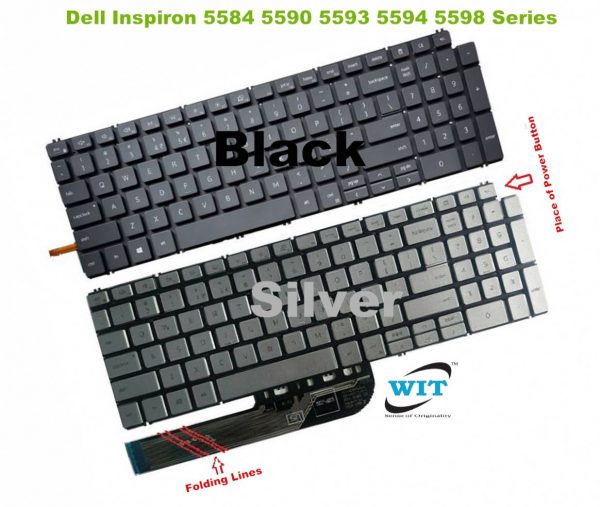
Description Fit for Laptop Models: Dell Inspiron 5584 5590 5593 5594 5598 Series Keyboard Dell Inspiron 5584 Series Dell Inspiron 5590 Series Dell Inspiron 5593 Series Dell Inspiron 5594 Series Dell Inspiron 5598 Series Dell Inspiron 7590 7591 7791 2 in 1 Laptop Keyboard Dell Inspiron 7590 Series Dell Inspiron 15 7590 Series Dell Inspiron 15-7590 Series Dell Inspiron 7591 Series Dell Inspiron 7790 Series Dell P42E keyboard Dell P88F keyboard Dell P90F keyboard Dell Vostro 5501 5502 P102F 5590 P88F Latitude 3510 Dell Inspiron 15-7591 keyboard Dell Inspiron 7590 keyboard Dell Inspiron 5593 keyboard Dell Inspiron 5598 keyboard Dell Inspiron 5590 keyboard Dell Inspiron 5584 keyboard Dell Inspiron 5594 keyboard Dell Inspiron 7500 2 in 1 Dell lnspiron 5000 15-7591 7590 5590 5584 7790 7791 5594 5598 5593 P42E P88F P90F CN 0NH88W Dell Inspiron 15 7591 5584 7590 7791 Keyboard CN 0NH88W Dell Inspiron 7500 keyboard Dell Inspiron 15-3501 3502 3505 5501 5502 5508 5584 5590 5591 5593 5594 5598 series Dell Inspiron 15-7500 7501 7590 7591 series Dell latitude 3510 series Dell Inspiron 3501 3502 3505 5501 5502 5505 5508 5509 5584 5590 5593 5594 5598 7500 7501 7506 7590 7591 7706 7791 / Vostro 5590 7500 7590 Dell Vostro 3500/3501/7500/7590 (08WXP3) DELL Inspiron 7500 7501 7506 7590 7591 7706 7791 2-in-1 Note: Dell 15 (17) –3000 / 5000 / 7000 is series, isn’t laptop model !! must note it !! For Dell Inspiron 15-3000 series 3501 3502 3505 / P90F laptop (**** released in 2020 Year **** ) For Dell Inspiron 15-5000 series 5501 5502 5505 5508 5509/ P102F laptop (**** released in 2020 Year **** ) For Dell Inspiron 15-5000 series 5584 P85F / 5590 5591 5593 5594 5598 P90F laptop (**** released in 2019 Year **** ) For Dell Inspiron 15-7000 series 7500 7506 P97F / 7501 P102F laptop (**** released in 2020 Year **** ) For Dell Inspiron 15-7000 series 7590 7591 laptop (**** released in 2019 Year **** ) For Dell Inspiron 17-7000 series 7706 2 in 1 ,7790 ,7791 2 in 1 / P98F laptop (**** released in 2020 Year **** ) For Dell Vostro 15-5000 series 5501 5502 / P102F,5590 P88F laptop (**** released in 2019 Year **** ) For Dell Vostro 15-7000 series 7500 7590 / laptop (**** released in 2020 Year **** ) For Dell Latitude 15-3000 series 3510 / P101F laptop (**** released in 2019 Year **** ) ******************************************************************************************************** ———Note: can’t compatible Dell latitude 15 5000 series 5501 (**** released in 2019 Year **** ) laptop ———Note: can’t compatible Dell XPS 15 7590 series (**** released in 2019 Year **** ) laptop ———Note: can’t compatible Dell G7 7590 series (**** released in 2019 Year **** ) laptop How to Install / Replace your Dell P88F keyboard ? Turn off your laptop. Disconnect the AC adapter and any cables, then remove the battery. Turn the laptop over and let it cool off for a few minutes before you begin. On the underside of the notebook, you’ll find screws holding the keyboard and palm rest in place. Set the screws aside, and be sure to keep track of them all. Turn it over and open the Lid. Slide your fingers under the top of the palm rest and gently pull it up, moving from the center to the outer left and right edges. Leaving the fingerprint reader attached, place the palm rest down in front of the unit. Lift the damaged DELL P90F Keyboard up from the front, then pull it toward you to release it from the notebook’s frame. Pull up on the connector to detach. Attach the new DELL P90F Keyboard replacement’s connector. Position it over the space vacated by the old connector, and press down firmly until it snaps into place. Slide the top of the keyboard under the lip of the frame (near the display). Ensure that the top edges are just under the frame. Tilt the keyboard down until it lays flat and sits flush with the top, left, and right edges of the frame. Align the bottom edge of the palm rest along the base of the frame, then press down until the top is also in place. Press firmly on the left and right edges to snap the palm rest into place again. Close the Lid, and turn the notebook over. Replace all the screws, making sure to tighten them securely. Insert the battery, plug in your AC adapter, and enjoy your new keyboard. Product Code: WIT10106 Categories: DELL, Inspiron, Laptop Keyboard/Keypad, Vostro